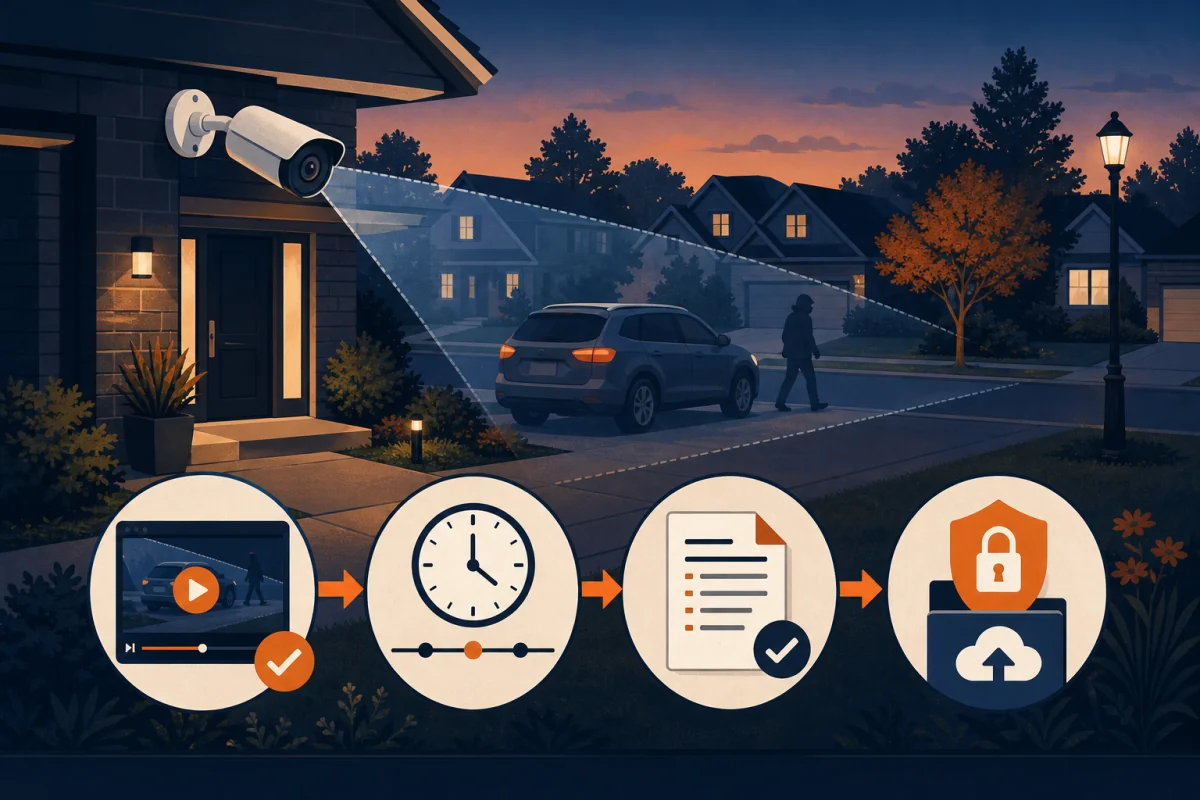
You open the camera app and see exactly what you hoped you would never need: someone checking car doors, taking a package, damaging the property, or walking away from a neighbour's home at 2 a.m.
Do not start by trimming the clip for Facebook. Save the original footage, record the exact time and camera, then report the incident through the right Durham Regional Police Service channel. If the crime is still happening or anyone may be in danger, call 911.
Key Takeaways
- Call 911 for a crime in progress or an immediate threat to life or property
- Save an untouched export with several minutes before and after the event
- Keep footage from every camera that shows the approach, incident, or exit
- Use the DRPS non-emergency line or online reporting portal for incidents that are already over
- CAMSafe is voluntary and does not give police live access to your cameras
- Registering with CAMSafe does not replace making a police report
This guide covers the practical next steps for a home or small business anywhere in Durham Region, including Courtice, Bowmanville, Oshawa, Whitby, Ajax, Pickering, Clarington, Uxbridge, Brock, and Scugog.
First, decide whether it is an emergency
The footage matters, but safety comes first.
Call 911 if the crime is happening now, someone may be in danger, or there is an immediate threat to life or property. DRPS lists a robbery or theft in progress among the reasons to call 911. Do not go outside to confront the person just to get a better look.
If the incident is already over and nobody is in immediate danger, use a non-emergency route:
| What happened | What DRPS says to use |
|---|---|
| Crime in progress or immediate danger | Call 911 |
| Break-in or attempted break-in at a home, garage, or business | Call 1-888-579-1520 and press 0 |
| Stolen vehicle, known suspect, or known suspect vehicle plate | Call 1-888-579-1520 and press 0 |
| Eligible minor theft, theft from a vehicle, mischief, or property damage | Use the DRPS online reporting portal |
| You are unsure which route fits | Call 1-888-579-1520 and press 0 |
The online portal is not monitored for emergencies. DRPS also limits online reports to certain incident types and values, so check the current list before you begin. Their 911 communications guide explains the emergency and non-emergency split.
Step 1: save the footage before it is overwritten
Camera recorders reuse storage. Once the hard drive is full, the oldest footage is normally overwritten by new footage. Your retention window might be days or weeks, but the safest time to export is now.
Start with these four details:
- The date and approximate time of the incident
- The name or location of the camera, such as "driveway" or "side gate"
- The time shown on the recording
- Whether the recorder's clock appears early or late compared with your phone
Then export the incident with several minutes before and after it. The useful detail may happen outside the obvious moment: a vehicle passes once before returning, a person approaches from a side street, or a second camera catches the direction they leave.
Save footage from every camera that adds context. For a driveway incident, that often means the driveway view, front door, and side camera. If you are not sure when the event began, export a wider window rather than guessing too tightly.
Step 2: keep one untouched copy
Keep the original export exactly as the recorder created it. Do not crop it, brighten it, add arrows, cover a face, or run it through a messaging app.
Editing does not automatically make footage useless, but it creates a second question: what changed between the recording and the file police received? Avoid that problem by keeping one untouched copy.
A simple setup works:
- Copy 1: the untouched export on a USB drive or computer
- Copy 2: a backup on another drive or secure storage account
- Notes: the camera name, visible time, real time if different, and what you observed
If the recorder exports a video plus a small playback application, keep both. If it offers both its original format and a standard MP4 copy, save both. Do not delete the recorder's original footage after exporting.
A phone recording of the monitor can help you explain what happened quickly, but it should not be your only copy. It loses resolution, timing data, and the wider scene.
Step 3: report what happened, not what you assume
When you call or complete the online report, describe what the footage actually shows.
Good: "At 2:14 a.m., a person in a light jacket walked up the east side of the driveway and tried the passenger door handle."
Less useful: "This is the same person stealing cars all over the neighbourhood."
Write down the details while they are fresh:
- Exact location
- Approximate real-world time
- Which cameras recorded the event
- Person, clothing, vehicle, and direction of travel
- Whether a face or licence plate is actually readable
- Any property taken or damaged
- Whether nearby homes or businesses may have another angle
After an online report is submitted, DRPS says you receive a temporary case number while it is reviewed. Keep that email. Once approved, the report receives an incident number.
Step 4: share the footage through the process DRPS provides
Tell DRPS that you have original camera footage when you make the report. Keep the temporary or incident number beside your files.
Follow the officer's or reporting system's instructions for sending the video. Do not email a large file to the general DRPS website address; DRPS states that address is for website feedback, not crime reports. If you receive a secure upload link, check that it belongs to the case before uploading.
Send the untouched export unless the investigator requests something different. Include a short note with:
- Incident number
- Property address
- Camera name and direction
- Start and end time of the clip
- Any clock difference you noticed
- Your name and a phone number where you can be reached
If you also make a shorter viewing copy, label it clearly and keep the original beside it.
What CAMSafe does, and what it does not do
DRPS joined CAMSafe in November 2025. It is a free, voluntary registry for home, doorbell, and business cameras in Durham Region.
When you register, CAMSafe stores basic contact information and camera locations. If a crime happens nearby, police can look for registered cameras in that area and contact the owner to ask whether useful footage exists.
CAMSafe does not:
- Give police your camera password
- Let police watch a live feed
- Give police automatic access to recordings
- Require you to approve every future footage request in advance
- Replace making a police report
Participation remains voluntary. CAMSafe says you can update or delete your information, and police must still ask you for footage. The DRPS camera registry page explains the local program, while the CAMSafe registration terms spell out what information is shared.
There is a useful neighbourhood angle here. Your own property may be fine, but a camera facing the road could have captured the vehicle involved in a break-in two doors down. Registration helps investigators find that possible angle without knocking on every door.
One caution: registering after an incident does not report the incident. Contact DRPS first, then register for future requests if you are comfortable doing so.
Before the next incident, run a five-minute footage test
The worst time to learn how your recorder exports video is after something happens.
Open your system this week and check five things:
- Time: Is the date, time, and time zone correct on every camera?
- Retention: How far back can you currently review footage?
- Export: Can you save a two-minute clip and play it on another device?
- Coverage: Can you see the route people and vehicles use to approach and leave?
- Detail: At night, can you identify a face or plate, or only see a moving shape?
That last point is where many systems fail. Digital zoom cannot create detail the camera never captured. A sharp plate view needs the right resolution, lens, distance, angle, and lighting. Our guide to why 4K matters for licence plates explains the practical limits.
If one camera is doing too many jobs, split the work. A doorbell view identifies someone at the porch; a driveway camera watches the approach and vehicle. See why most Durham homes need both views.
The footage is evidence, not the whole security plan
A camera helps document what happened. It does not lock a door, light a dark side yard, or stop someone from entering.
DRPS recommends layers: strong locks and strike plates, clear sightlines, lighting, alarms, visible cameras, and neighbours who pay attention. Their current residential break-and-enter guidance also recommends registering cameras with CAMSafe.
Good footage still matters. It can show a clear sequence, identify a person or vehicle, establish a time, and connect your incident with another one nearby. The system only earns that value when the camera is aimed properly, the clock is right, and you can export the recording before it disappears.
If your current cameras leave you with a blur, a blind spot, or an app you cannot export from, we can walk the property and show you what needs to change.
Book your free in-home assessment
Frequently asked questions
Should I call 911 if I see a crime on my camera?
Call 911 when the crime is happening now, someone may be in danger, or there is an immediate threat to life or property. For an incident that is already over, use the Durham Police non-emergency line or online reporting system, depending on what happened.
Does registering with CAMSafe give Durham Police access to my cameras?
No. CAMSafe records your contact information and the location of your cameras. Police cannot watch your system or log into it. If footage may help an investigation, an officer can contact you and ask whether you are willing to share it.
Does CAMSafe replace making a police report?
No. CAMSafe is a camera-location registry, not a crime-reporting service. Report the incident to Durham Police first. Registering with CAMSafe can help officers find your cameras during this or a future neighbourhood investigation.
How much security camera footage should I save?
Save the event plus several minutes before and after it. If the time is uncertain, export a wider window and footage from any camera showing the person or vehicle approaching and leaving. Keep an untouched copy of every original export.
Should I post the footage on social media?
Save and report it first. Ask the investigating officer before posting footage publicly, especially when it shows a victim, a child, a vehicle plate, or the inside of a neighbouring property. Keep the original file private even if police approve sharing a separate copy.
A useful camera system does three things: it records the right angle, keeps the footage long enough, and lets you export it when something happens. Test those three things before you need them.